
Zooplop
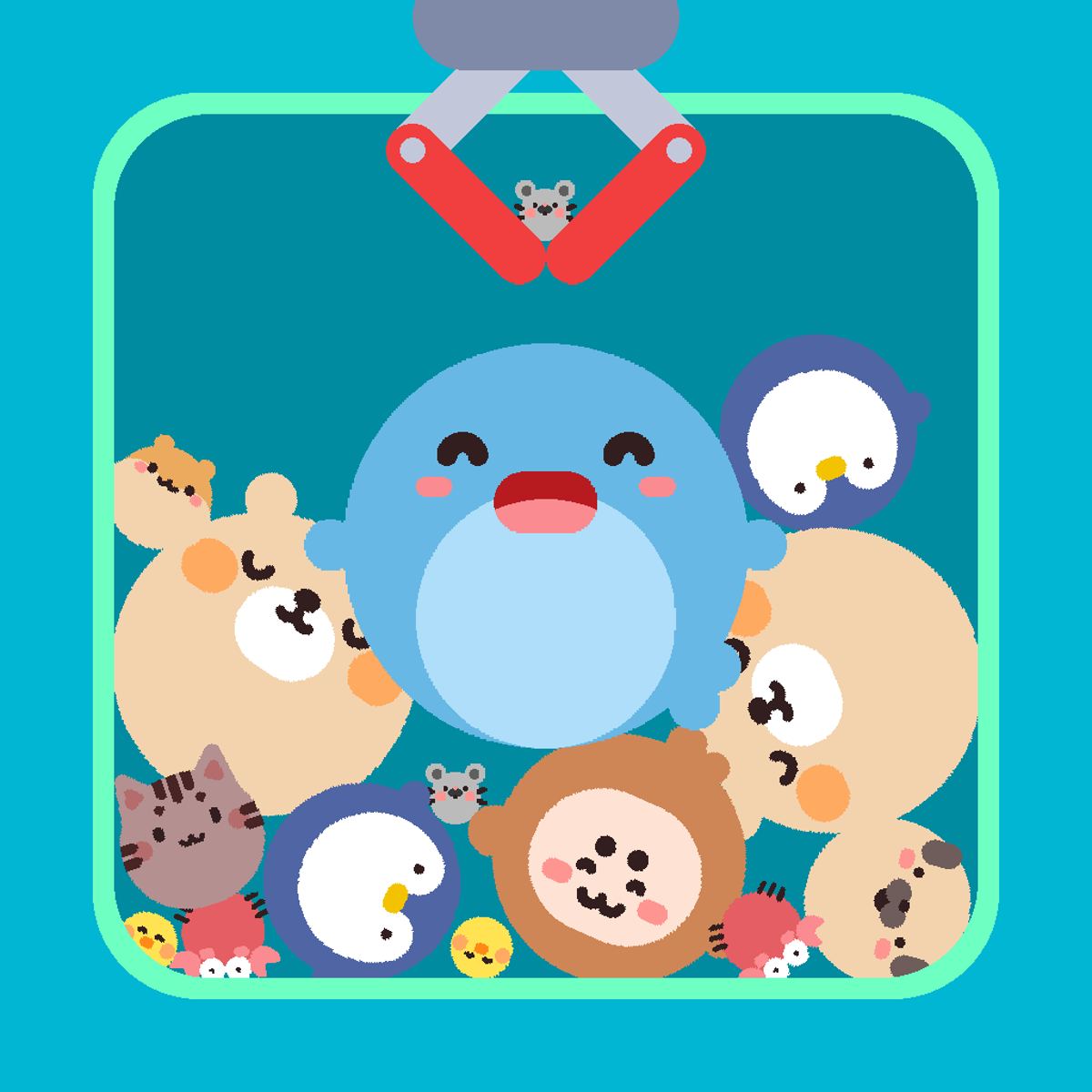
Watching a tiny mouse bump into another mouse and turn into a chicken never gets old. Zooplop, a free browser game from developer Venturous, gets that. It’s a merge puzzle where cute animals drop from the top of the screen, and you place them so identical creatures combine into bigger, more elaborate ones. The chain reaction starts small—mouse plus mouse equals chicken—but soon you’re working up to crabs, foxes, and the final prize: a majestic whale. The loop takes seconds to learn, but the constant pressure of new animals falling keeps your brain humming.
What makes Zooplop work is its rhythm. You’re not just matching tiles on a grid; you’re physically dragging animals around a board, trying to stay organized while the game throws new critters at you faster than you’d like. There’s a gentle tension between speed and precision. Drop too hastily and you’ll block yourself. Hesitate too long and the board fills up. It’s perfect for a five-minute break or a longer session when you want your mind to zone out on something satisfying. The colorful, rounded art style helps—everything feels soft and friendly, even when you’re scrambling to make space.
Released in November 2023, Zooplop has earned over 68,000 votes and a solid 4.2 rating. It’s available on desktop and mobile, free to play in your browser. No downloads, no fuss. Just you, a bunch of animals, and that one whale sitting at the top of the evolution tree, waiting to be reached.
How to Play
The goal in Zooplop is straightforward: merge identical animals to create the next creature in the chain, and keep doing that until you make a whale. The game gives you a rectangular board with a little well at the bottom. Animals appear one at a time at the top, and you drag them into position before dropping.
On desktop, hold down the left mouse button and move your cursor to control the falling animal. When you’re happy with the spot, release to drop. Alternatively, use the keyboard: A and D (or left and right arrow keys) to slide the animal left or right, and S (or down arrow) to drop it immediately. The keyboard controls are more precise once you get used to them, especially when the board gets crowded.
On mobile, it’s all touch. Tap and drag the animal where you want it, then let go. The game scales well to phone screens, and the touch response is snappy. Just be careful not to block your own view with your finger—it’s easy to accidentally drop something in the wrong spot if you’re not paying attention.
Animals stack on top of each other, but only identical types merge. Two mice become one chicken; two chickens become one crab; two crabs become one fox; and so on. The chain has several steps, and the final merge is the whale. Once you reach it, you get a little celebration, and then you can keep playing to see how many whales you can make or just aim for a high score.
There’s no timer, no lives, no game over in the traditional sense. The board just fills up, and if you run out of space, you can’t place any more animals. The game ends when you have no room to drop the next creature. So the real challenge is managing your real estate.
Features
Zooplop doesn’t have multiple modes or power-ups—it’s a single, clean experience. That simplicity is part of its charm. Here’s what stands out:
- Cute animal progression. The creatures are drawn in a chunky, kawaii style. Each new tier is a fun reveal. The chicken is goofy, the crab is sassy, and the whale is genuinely majestic. The visual feedback when two animals merge—a little pop and a sparkle—is very satisfying.
- Smooth controls on both platforms. The drag-and-drop works well, and the keyboard option is a nice touch for players who want more accuracy. The mobile version is just as responsive, which isn’t always the case for browser games.
- Relaxing but not boring. The pace is gentle at first, but as the board fills, you’ll start to feel a mild pressure. The kind of game you can play while listening to a podcast or watching something in the background.
- High replay value. Since there’s no fixed level, every session is different. You can try to beat your own record for the biggest animal or just see how many merges you can chain before the board chokes.
- Free, no ads forced on you. You’ll see some ads between sessions, but they’re not intrusive. You can play as long as you want without being interrupted.
Tips and Strategies
Getting to the whale isn’t hard—but doing it consistently, without flooding your board, takes a little planning. Here are some practical tips from someone who’s merged a lot of mice:
Keep the center clear. Animals tend to fall in the middle, so try to keep a vertical lane open. Push your merged creatures to the sides. That way you always have room to drop new animals without them landing on top of a critical spot.
Merge as soon as possible. Don’t hold onto two mice hoping for a third. The moment you have a pair, put them together. The resulting creature takes up less space, and you free up a slot. The only exception is if you’re deliberately saving a spot for a specific merge chain, but that’s risky.
Use the keyboard on desktop. The mouse drag is fine, but when the board gets crowded, it’s easy to accidentally drop an animal one column off. The arrow keys give you pixel-perfect placement. I use left/right to position and then press S to drop. It’s faster and more reliable.
Don’t ignore small animals. It’s tempting to focus on merging the big ones, but the little mice and chickens are the foundation. If you let them pile up, they’ll clog the board. Always prioritize merging the smallest creatures first, because they multiply fastest.
Plan your chains. If you have two crabs and a fox, don’t merge the crabs right away if it’ll block the fox. Think two steps ahead. Try to group animals of the same tier together so you can merge them in sequence.
Use the walls. The edges of the board are your friends. Park larger animals against the sides so they don’t block the middle. The whale is huge—it takes up a lot of space—so you’ll want to put it in a corner as soon as you make it.
Don’t chase the whale too early. If you force merges just to get to the top, you’ll create a mess. Let the game flow naturally. Sometimes you’ll get lucky and two high-tier animals will appear close together. Other times you’ll need to be patient.
Common Mistakes
New players often fall into the same traps. Here’s what to watch out for:
Dropping animals randomly. It’s easy to just click and release wherever, especially when things get hectic. But every misplaced animal creates a problem later. Take the extra half-second to aim.
Letting the board fill up with singles. If you have ten different animals and none of them match, you’re in trouble. Always try to keep at least a few pairs in progress. If you see two of the same type, merge them immediately.
Ignoring the keyboard controls. Many desktop players stick to the mouse and then complain about accuracy. The keyboard is your friend. Learn the arrow keys and the S key. It makes a noticeable difference.
Overthinking. The game is meant to be casual. If you spend too long deliberating where to put a mouse, the next animal will drop and ruin your plan. Sometimes you just have to commit. A slightly imperfect placement is better than no placement at all.
Not using the full board. Some players only use the middle columns. The edges are useful. Spread your animals out. You have a whole rectangle, not just a narrow strip.
FAQ
Can I play Zooplop on my phone?
Yes. The game works in your mobile browser. Just tap and drag the animals to move them. It’s optimized for touch screens.
What happens when I merge two whales?
Nothing special—whales are the final tier. They don’t merge further. You can still move them around, but they just sit there taking up space. The game continues until the board is full.
Is there a way to undo a drop?
No. Once you release the animal, it stays where it is. You can’t pick it up again. So be sure before you let go.
Who made Zooplop?
It was created by Venturous, the same developer behind games like Gobdun, Catpad, and Cubies. They specialize in casual puzzle games.
Is Zooplop really free?
Yes. You can play it in your browser without paying anything. There are optional ads that support the developer, but no paywalls or microtransactions.
---
Zooplop is one of those games you come back to whenever you need a few minutes of calm focus. It’s not trying to reinvent the merge genre—it’s just doing it really well, with charming animals and tight controls. Give it a try, and see how far up the chain you can climb.