








Ludo Multiplayer
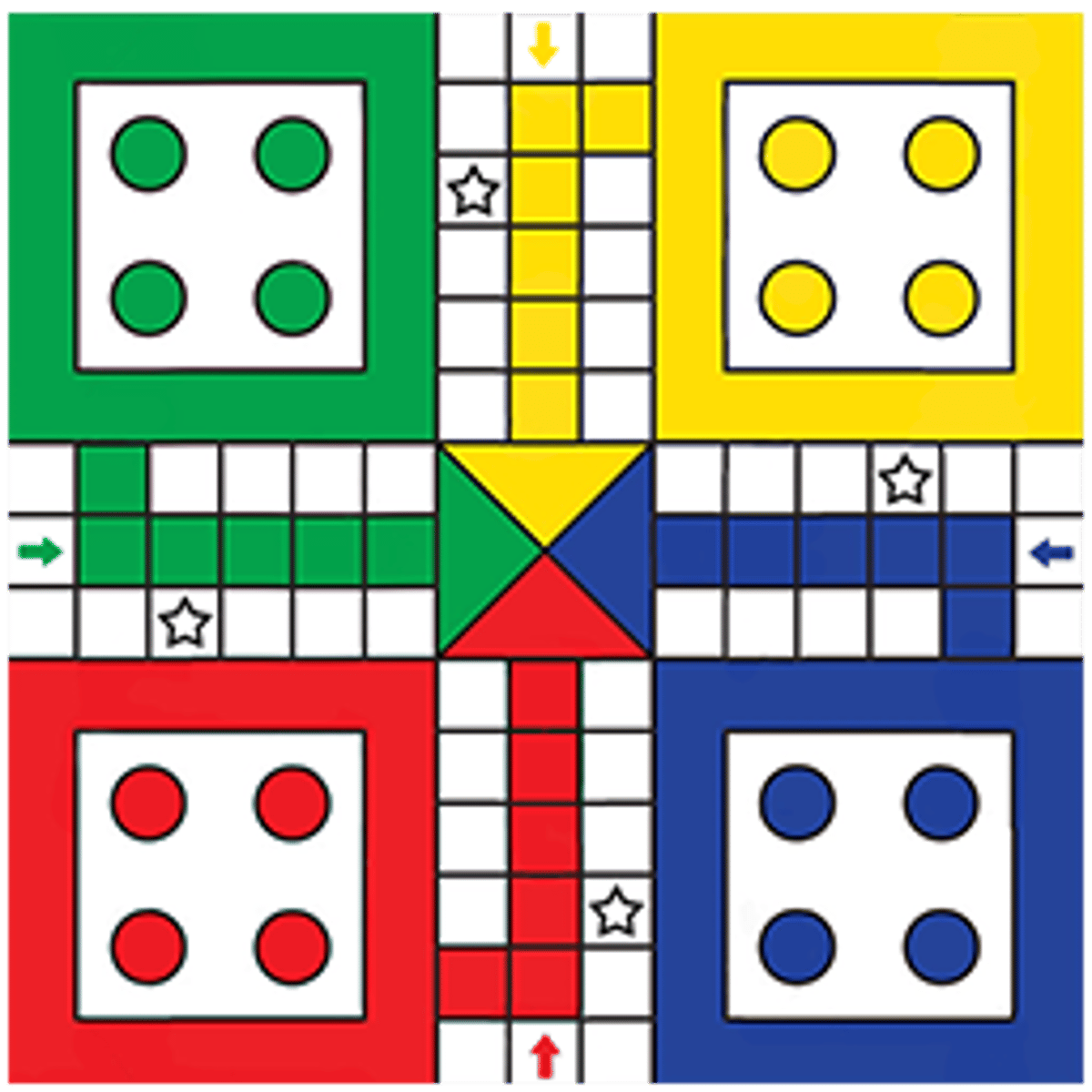
If you’ve ever spent an afternoon hunched over a cardboard board, shaking a tiny plastic dice cup and praying for a six, you already know the appeal of Ludo. It’s a rare game that balances chaos and strategy, where a single roll can turn a sure victory into a humiliating defeat. Ludo Multiplayer, developed by Freak X Apps and available free on Poki, brings that same tension to your browser or phone screen. No setup, no lost pieces, no arguments about who knocked the dice off the table—just pure, distilled Ludo against real opponents or AI.
It sticks to the classic formula: four colored tokens per player, a cross-shaped board, and the eternal race to get all your pieces safely home. What sets this version apart is how quickly you can jump into a match. Click, get matched with someone (or a bot), and within seconds you’re rolling. The interface is clean, the animations are smooth without being flashy, and the sound effects—a cheerful dice rattle, a satisfying thunk when a token lands—are just enough to keep you engaged without being annoying. It’s the kind of game you fire up while waiting for a download or during a coffee break, and suddenly it’s an hour later and you’ve sworn off dice forever.
Why does Ludo still hook people? It’s the perfect balance of luck and skill. You can make brilliant moves, block your opponent, set up perfect captures—and then roll a one when you needed a six, and watch it all fall apart. That unpredictability keeps every match fresh. Ludo Multiplayer captures that feeling faithfully, and the online matchmaking means you’re never playing the same person twice unless you want to. Whether you’re a veteran who knows every safe spot by heart or a total newbie who just wants to move some colorful pieces around, this game has a place for you.
How to Play
The objective is simple: be the first player to move all four of your tokens from the starting area, around the board, and into the home column. Each player has a designated starting square and a home stretch of their own color. The path is a clockwise loop, and you’ll encounter opponents’ tokens along the way.
The Basics
- Rolling the dice: You get one roll per turn. The dice shows numbers 1 through 6. Rolling a 6 gives you a bonus turn. (In some rules, landing on a star square also grants an extra roll—more on that later.)
- Getting out of base: To move a token from your starting circle onto the board, you must roll a 6. Until you do, that token stays put. You can choose which token to move when you roll a 6, and you get another roll immediately after.
- Moving tokens: After rolling, click or tap the token you want to move. It advances clockwise the number of squares shown on the dice. You can only move one token per roll (except when you roll a 6 and get an extra turn, which allows a second move).
- Capturing: If your token lands on a square occupied by an opponent’s token, that opponent’s token is sent back to their base. They’ll need to roll a 6 to bring it out again. Capturing also gives you a bonus roll.
- Safe squares: Squares marked with a star (usually four of them on the board, plus each player’s starting square) are safe. No token on a safe square can be captured. Also, the starting square of each color is safe for that player’s tokens.
- Star squares and shortcuts: Some boards have star squares that act as shortcuts, allowing your token to jump ahead several spaces. In Ludo Multiplayer, these are present and work as expected—landing on a star square moves your token forward along the shortcut path.
- Home column: Once your token has completed the full loop and reaches the square just before your home column, you enter the colored column. You must roll the exact number to land on the center home square. If you overshoot, you bounce back and try again next turn.
Controls
On desktop, you control everything with mouse clicks. Click the dice to roll it. Then click one of your movable tokens to select it. The token will automatically move the correct number of spaces. On mobile and tablet, it’s the same but with taps. The interface is responsive and works well on smaller screens—buttons are large enough to tap without misclicking. There’s no keyboard input needed; it’s all point-and-click (or point-and-tap).
One thing to note: the game doesn’t let you undo a move. Once you click a token, it moves. So think before you tap. Also, if you have multiple tokens that can move, the game highlights them, but you still have to choose. There’s no auto-play, which is good—it keeps you engaged.
Game Modes
Ludo Multiplayer offers a few ways to play, though the core rules remain the same.
Online Multiplayer
This is the main draw. You can play against real people from around the world. The matchmaking is quick—usually under ten seconds. You can choose between 1v1 (two players) or 2v2 (teams of two). In team mode, you and your partner share the same color team (usually red and yellow vs. green and blue). You can’t capture your teammate’s tokens, and you both win if your team gets all tokens home first. Team play adds a layer of coordination: you can block opponents together, and sometimes sacrifice a token to save your partner’s.
Play vs. AI
If you want to practice or just play without the pressure of a live opponent, you can face computer-controlled players. The AI is decent—it makes reasonable decisions, knows when to capture, and doesn’t make obvious blunders. But it’s not unbeatable. Playing against AI is a good way to learn the board layout and test strategies before jumping into online matches.
Private Rooms
You can create a private room and invite friends by sharing a code. This is perfect for playing with people you know. The room supports up to four players, and you can set it to 1v1 or 2v2. There’s no voice chat, but you don’t really need it—Ludo is a game of glares and silent prayers.
Quick Match
If you just want to jump in immediately, the Quick Match button throws you into a random online game, either 1v1 or 2v2 depending on availability. It’s the fastest way to play.
Tips and Strategies
Ludo looks like a game of pure luck, but anyone who’s played a hundred matches knows better. Here are some practical tips that will improve your win rate.
Get All Tokens Out First
The biggest mistake new players make is rushing one token all the way around while leaving the other three in base. Yes, you want to get a token home, but having only one token on the board is risky. If it gets captured, you’re back to square one—literally. Aim to get at least two tokens out as quickly as possible. Rolling a 6 is precious, so use it to bring out a new token rather than moving an existing one far ahead, unless that existing token is in immediate danger.
Use Safe Squares Wisely
Safe squares (the star squares and your starting square) are your best friends. If you have a token on a safe square, it cannot be captured. Use them as resting points. When you’re ahead, it’s often smart to leave a token on a safe square rather than pushing it into dangerous territory. Conversely, if an opponent has a token on a safe square, you can’t do anything about it—so focus on their other tokens.
Block Opponents
The board is narrow in places. If you can place two of your tokens on the same square (which is allowed—they stack), you create a block. Opponents cannot pass through that square. This can completely stall their progress, especially near their home column. Be careful, though: a block also means you have two tokens vulnerable to capture if an opponent lands on that square (though they can’t land on a stacked square unless they roll exactly that number, and even then, they capture only one token? Actually, in standard Ludo, if you land on a stacked square, you capture all tokens there. So stacking is risky. Better to use single tokens on safe squares to block, or use the star squares to leapfrog.)
When to Be Aggressive
If you have a comfortable lead—say, two tokens already in the home column—you can afford to take risks. Go after opponents’ tokens. Capturing sends them back and gives you a bonus roll. But don’t chase a capture if it leaves your own token exposed in the middle of the board. Only go for captures when you can land on a safe square immediately after, or when the opponent’s token is close to their home.
Use Star Squares for Shortcuts
Star squares are marked on the board. Landing on one teleports your token forward several spaces. This is huge. If you have a choice between moving a token that will land on a star square and one that won’t, almost always choose the star square. It can cut your path length by a third. Memorize where the star squares are relative to your starting position.
Manage Your Bonus Rolls
Rolling a 6 gives you an extra turn. Use that extra turn wisely. If you have a token that can capture an opponent, do that first (since capturing also gives a bonus roll, you could chain multiple moves). If no capture is available, consider bringing out a new token or moving a token to a safe square. Don’t waste the bonus on a token that’s already safe.
Watch the Opponent’s Dice
Pay attention to what your opponent rolls. If they keep rolling 1s and 2s, they’re stuck. That’s your chance to advance. If they’re rolling 6s, expect them to bring out tokens and possibly target you. Adjust your strategy: if an opponent is close to your token, move it to a safe square or advance it quickly.
Common Mistakes
Even experienced players fall into these traps. Avoid them and you’ll win more often.
Leaving Tokens in Base Too Long
Some players get one token out and then focus solely on moving it around the board, ignoring the others. This is a recipe for disaster. If that single token gets captured, you have nothing on the board and have to start over. Always aim to have at least two tokens active. The more tokens you have on the board, the more options you have each turn.
Not Using Safe Squares
It’s tempting to keep moving forward every turn, but sometimes the smartest move is to stay put on a safe square. If you have a token on a safe square and roll a number that would move it off into danger, consider moving a different token instead. Patience pays off.
Chasing Captures Recklessly
Capturing feels great, but it can backfire. If you move a token to capture an opponent and that token ends up in a vulnerable spot (not on a safe square), the opponent might capture you right back on their next turn. Only go for captures when you can land on a safe square, or when the captured token was a serious threat.
Overshooting the Home Column
You need an exact roll to enter the home square. Many players get impatient and try to force it, moving a token into the home column when they’re still far from the end. That’s fine, but if you overshoot, you bounce back and waste turns. Sometimes it’s better to move a different token and leave the one near home for later, especially if you have other tokens that need to advance.
Rolling Too Fast
The game doesn’t have a timer, so take your time. Look at all your movable tokens. Consider the board state. Is an opponent’s token two spaces ahead of a safe square? Can you block them? Is there a star square within reach? Rushing leads to mistakes. Click the dice only after you’ve decided which token to move.
Ignoring Team Play in 2v2
In team mode, you and your partner share a color. You can’t capture each other, but you can block opponents together. Communicate (even without chat) by watching your partner’s moves. If your partner is about to capture an opponent, try to position your tokens to support. Don’t leave your partner’s tokens exposed if you can help it. Teamwork makes the game much easier.
FAQ
Is Ludo Multiplayer free to play?
Yes, it’s completely free. There are ads between matches (you can watch a short video to skip sometimes), but no pay-to-win mechanics. You don’t need to create an account to play.
Can I play with my friends?
Yes. Use the private room feature. Create a room, share the code with your friends, and they can join. Works for up to four players. You can also play against friends in 2v2 teams.
What happens if I lose internet connection during a match?
The game will try to reconnect. If you disconnect for too long, you’ll forfeit the match. It’s best to play on a stable connection. The game saves your progress only for the current session; there’s no account-based persistence.
How do I win?
Be the first player (or team) to move all four tokens into the home column. In 2v2, both teammates must get all tokens home. If one teammate finishes, they can still roll and use their turns to help block opponents, but they can’t move anymore.
Is there a ranking system?
The game doesn’t have a visible ranking or ELO system. You can see your win/loss record in the stats screen, but there’s no leaderboard. It’s more about casual fun than competitive climbing.
Can I play offline?
No, the game requires an internet connection to load and to matchmake. Even the AI mode might need a connection to load the game assets. It’s a browser game, so it’s not designed for offline play.
---
Ludo Multiplayer doesn’t try to be anything more than a solid, faithful adaptation of a classic board game. It’s quick to load, easy to play, and surprisingly deep once you start paying attention to positioning and probability. Whether you’re killing time solo or trash-talking friends in a private room, it delivers exactly what you’d expect—and sometimes that’s all you need.