


Sweet Ball Sprint
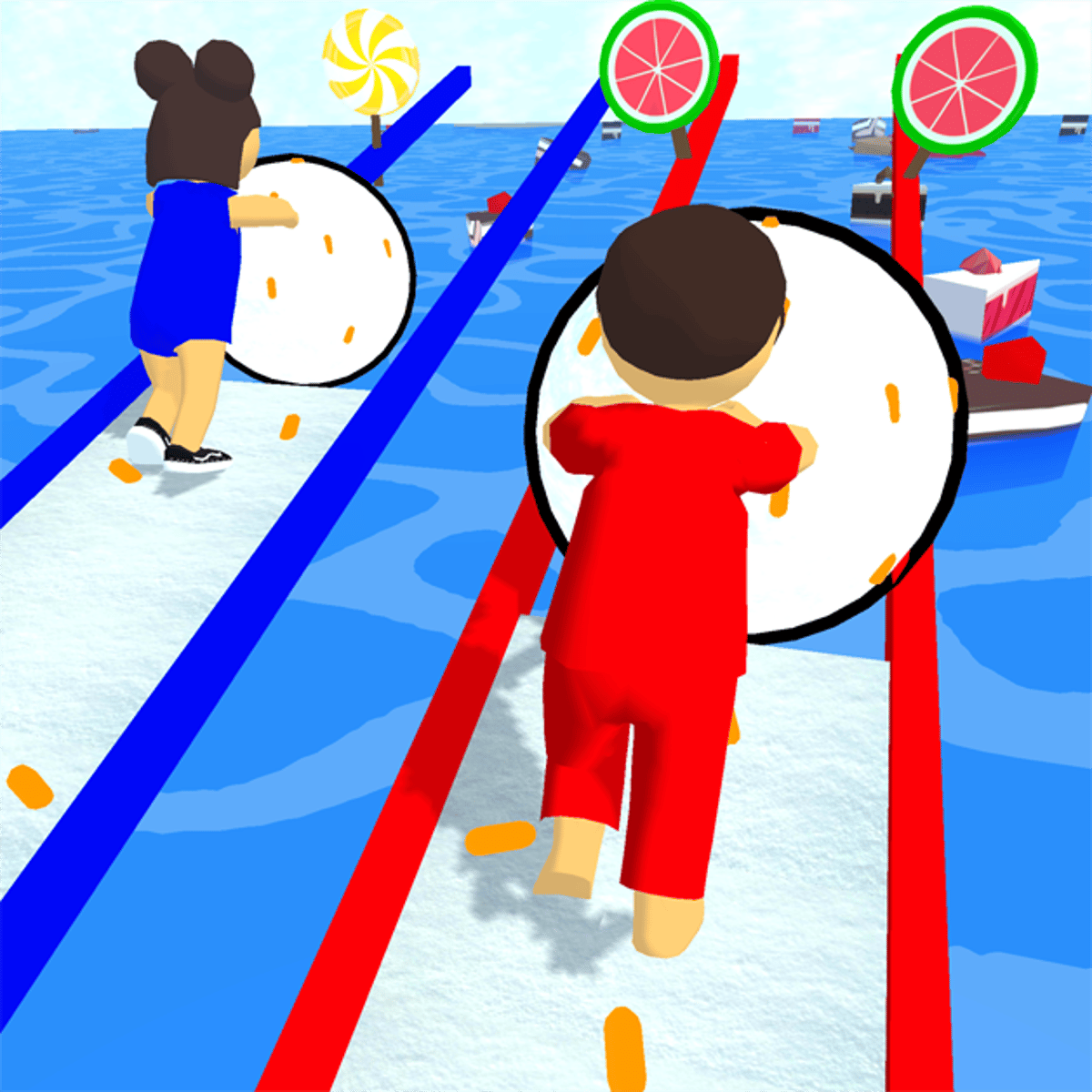
Rolling a snowball through a candy-colored world, mowing down treats, and beating a handful of other balls to the finish line—there’s a simple pleasure in it. That’s the core loop of Sweet Ball Sprint, a browser racing game from developer Xscape that landed on Poki in March 2025 and quickly racked up over 200,000 ratings. It doesn’t reinvent the wheel (or the snowball), but it nails that pick-up-and-play feel that keeps you coming back for “just one more race.”
The premise is straightforward: you control a snowball that grows as you collect candy scattered across the track. The bigger you get, the more momentum you carry, and the faster you can roll. But speed comes with a price—steering becomes trickier, and one wrong bump can send you off the road. It’s a balancing act between greed and control, and that tension is what makes the game click. The tracks are short, the races are tight, and the AI opponents aren’t pushovers. You’ll lose plenty of races by a hair, and that’s exactly what’ll make you hit retry.
Graphically, it’s bright and clean—low-poly 3D with a candy-land aesthetic. Roads twist through hills, loops, and little ramps, all lined with giant lollipops, gumdrops, and jellybeans. It’s not trying to be realistic, and that’s fine. The game runs smoothly even on older hardware, and the mobile version is just as responsive as the desktop one. If you’ve played any of those “roll the ball” games before, you’ll feel right at home, but the racing element adds a competitive edge those games often lack.
---
How to Play
The objective is simple: be the first to cross the finish line. You race against three or four other snowballs (controlled by AI) on a winding track. Candy appears in clusters and lines along the way. Rolling over candy makes your ball grow, increasing your speed and momentum. The bigger you are, the faster you go—but also the harder it is to steer and stop. Classic risk-reward.
Controls
Desktop (keyboard):
- W / Up Arrow – Move forward (accelerate)
- A / Left Arrow – Steer left
- S / Down Arrow – Move backward / brake
- D / Right Arrow – Steer right
You can also use a joystick or gamepad if you have one plugged in. The game detects it automatically, and it works well for finer steering. A controller gives you smoother analog input, which helps on hairpin turns where a keyboard tap can feel jerky.
Mobile (touch):
- On-screen virtual joystick appears on the left side of the screen. Drag your thumb to move the ball in any direction.
- Tap and hold to accelerate forward; release to slow down.
The mobile controls are surprisingly precise for a browser game. The joystick is responsive, and you can make quick adjustments without much lag. I’d still recommend a keyboard for the most control, but touch players won’t feel cheated. One tip: on mobile, try using two thumbs—one for the joystick and one for tapping the screen to accelerate. It feels more natural than trying to do everything with one thumb.
Basic Mechanics
- Candy collection: Candy is the only way to grow your ball. You don’t get bigger just by rolling—you have to actively collect. Some candy is on the track itself, other pieces are slightly off to the side, tempting you to leave the racing line. A single piece of candy gives a small size increase, but collecting a full line of five or six in a row gives a bigger boost and a momentary speed bump.
- Momentum: The bigger your ball, the faster you roll downhill, but you also slide more on turns. Braking (S or down arrow) helps, but it kills your speed and can cost you the race. The physics engine models inertia pretty well—once you’re big, you’ll feel the weight. On flat sections, you can coast without pressing accelerate, but you’ll lose ground to opponents who keep tapping.
- Collisions: Bumping into other balls can knock you off course or slow you down. Sometimes you can shove an opponent into a wall, but it’s risky—you might spin out yourself. The collision detection is forgiving enough that you can nudge someone without completely wrecking your line, but a full-on side impact will send both of you sliding.
- Track hazards: Some tracks have gaps, ramps, or narrow sections. If you fall off the road, you get reset to the last checkpoint with a small time penalty. It’s better to brake than to fly off a cliff. The penalty is about two seconds, which can drop you from first to last in a tight race. Checkpoints are placed before every major hazard, so you never lose too much progress, but those two seconds hurt.
---
Features
Sweet Ball Sprint doesn’t have a dozen game modes or a deep progression system. It’s a lean racing game that focuses on the core experience. Here’s what it does offer:
Track Variety
There are multiple tracks, each with its own layout and theme. Early tracks are simple ovals with gentle curves. Later ones introduce elevation changes, hairpin turns, and sections where the road splits. You unlock new tracks by placing in the top three in races. The difficulty ramps up nicely—just when you think you’ve mastered a track, the next one throws a loop or a steep drop at you.
Let me give you a few examples. The first track, "Candy Cove," is a gentle oval with a single straightaway and two wide turns. It’s meant to teach you the basics. Then you get "Gumdrop Gulch," which has a sharp S-curve near the end that catches everyone off guard the first time. Later, "Lollipop Loop" features a full 360-degree loop-the-loop that you can only clear if you’ve collected enough candy to have decent speed. Missing the candy before the loop means you’ll fall short and get reset. "Jellybean Junction" has a fork in the road—left is a shorter path with a tight turn, right is longer but wider. The AI sometimes splits, so you can see which path they took and adjust.
Each track also has a visual theme. Some are set on a pink cotton-candy sky, others in a green jellybean forest. The colors change, but the core candy-land aesthetic stays consistent. The variety keeps the races from feeling samey, even though the mechanics don’t change.
Candy Bonuses
Occasionally, a trail of golden candy appears. Collecting all of them in a row gives you a temporary speed boost and a bigger size increase than normal. These golden lines are usually placed on risky paths—near edges or before sharp turns. Going for them is a gamble, but it can pay off if you have the skill.
The golden candy appears every few races, not every lap. When you see that golden shimmer, you have to decide instantly: do you break off from the racing line to grab it? On "Gumdrop Gulch," the golden line appears on the inside of the S-curve, which is actually the optimal line anyway, so it’s a no-brainer. But on "Lollipop Loop," the golden candy is placed on the outside of the loop, meaning you have to drift wide and then cut back in. If you nail it, you’ll come out of the loop with a huge speed advantage. Miss it, and you’ll either fall off or lose too much time.
The speed boost from a full golden line lasts about three seconds and stacks if you collect multiple lines in quick succession. In practice, that means you can chain two golden lines and be untouchable for a straight section. But the boost doesn’t help much on turns—it actually makes steering harder because you’re going faster. So timing is everything.
AI Opponents
The AI is competent but not perfect. They have different “personalities”: some are aggressive and will try to bump you, others are conservative and stick to the racing line. You can learn their patterns and use them to your advantage. On harder tracks, the AI is faster and more accurate, so you’ll need to collect candy efficiently to keep up.
I’ve noticed that the AI tends to follow the same racing line each time on a given track, but they adjust if you block them. For example, on "Candy Cove," the lead AI always hugs the inside of the first turn. If you cut them off, they’ll brake and fall behind, giving you the lead. But on later tracks, the AI is smarter about avoiding collisions. They’ll swerve around you if you try to block them, so you have to be more subtle. A light nudge at the right moment can push them wide, but a full-on ram will just slow both of you down.
The AI also has a rubber-banding effect, but it’s subtle. If you’re way ahead, the AI behind you will get a small speed boost to keep the race close. If you’re way behind, you won’t get any help—you have to earn your way back. That keeps the races tense without feeling unfair.
No Microtransactions
This is a free browser game. No ads that interrupt gameplay, no pay-to-win power-ups. You just play. There’s a small ad banner on the side (on the Poki site), but it doesn’t intrude. It’s refreshing to see a game that doesn’t try to squeeze you for cash every few minutes. There’s also no energy system, no waiting for lives to refill. You can race as many times as you want, back to back. That alone makes it worth a bookmark.
Physics and Feel
The physics engine deserves a mention. It’s not realistic—snowballs don’t behave like this in real life—but it’s consistent and responsive. The ball has weight, and you can feel the difference between a small ball and a big one. A tiny ball accelerates quickly but has low top speed. A huge ball takes longer to get going but once it’s rolling, it’s hard to stop. That means you have to plan your braking earlier when you’re big.
The turning radius also changes with size. A small ball can make tight turns, almost pivoting on the spot. A big ball needs a wide arc, and if you try to turn sharply, you’ll slide outward. That’s where the drift mechanic comes in: if you hold the brake while turning, you can slide through a corner without losing too much speed. It’s not a full drift like in racing games, but it’s enough to shave off a tenth of a second. Mastering that slide is key to beating the AI on the harder tracks.
---
Tips and Strategies
After spending a good chunk of time with Sweet Ball Sprint, I’ve picked up a few tricks that separate a podium finish from a last-place disappointment.
1. Don’t Skip the Early Candy
In the first few seconds of a race, everyone is roughly the same size. If you miss the initial candy clusters, you’ll fall behind immediately. Make it a habit to steer toward the first line of candy, even if it means a slight detour. The size boost you get is worth more than the fraction of a second you lose. On "Candy Cove," the first candy cluster is just off the starting line to the left. If you go straight, you miss it. Every time I missed it, I ended up in fourth place by the first turn.
2. Brake Before Turns, Not During
This is the most common mistake I see new players make. They enter a turn at full speed, then try to brake while turning, which causes them to slide wide or spin out. Instead, brake before the turn to slow down, then steer through the turn with a little acceleration. You’ll maintain better control and lose less time overall. On "Gumdrop Gulch," the S-curve is especially punishing if you brake late. I’ve seen players fly off the track on the second apex because they didn’t scrub speed early enough.
3. Use the Ramp to Your Advantage
Some tracks have ramps that launch you into the air. While airborne, you can steer slightly to adjust your landing. Try to land on a candy cluster to continue growing. Also, if you land on an opponent, you can push them off balance. It’s a bit of a cheese move, but it works. On "Lollipop Loop," the ramp before the loop sends you high into the air. If you steer left mid-air, you can land on the inside of the loop, cutting off a few meters. But be careful—if you overshoot, you’ll land off the track and get reset.
4. Learn the Golden Candy Routes
Golden candy lines are usually placed on the inside of a curve or on a shortcut. Memorize where they appear on each track. Going for them is risky, but if you can nail the line, you’ll gain a significant speed boost that can carry you past the AI. On tracks with multiple golden lines, collecting all of them in a row can make you nearly unbeatable. For example, on "Jellybean Junction," there’s a golden line on the left fork. If you take that path and collect all the gold, you’ll come out ahead of anyone who took the right fork, even if they had a clean run.
5. Keep an Eye on the Minimap
There’s a small minimap in the corner that shows the track layout and the positions of other racers. Use it to anticipate upcoming turns and to see if an opponent is about to cut you off. It’s easy to ignore in the heat of the moment, but glancing at it every few seconds helps you plan ahead. On "Candy Cove," the minimap shows a sharp turn coming up that isn’t visible from the starting line. If you see it early, you can brake earlier. Also, if you see an opponent closing in from behind on the minimap, you can move to block them before they get alongside.
6. Don’t Be Afraid to Bump
The AI will bump into you, so return the favor. If you’re neck-and-neck with an opponent going into a turn, nudge them toward the outside. They’ll either have to brake hard or go wide, giving you the inside line. Just be careful not to bump yourself into a wall. I’ve found that a gentle tap from the side is more effective than a head-on collision. On "Gumdrop Gulch," if you’re side-by-side with an AI before the S-curve, a small nudge to the right will push them into the wall, and you can take the inside line cleanly.
7. Manage Your Momentum on Downhill Sections
Downhill stretches are where you gain the most speed. If you’re already big from collecting candy, you’ll fly downhill. That’s great, but it also means you’ll overshoot the next turn if you don’t brake early. On downhill sections, start braking a little earlier than you think you need to. It feels counterintuitive, but it saves you from crashing. On "Lollipop Loop," there’s a long downhill that ends in a hairpin. If you don’t brake at the top of the hill, you’ll fly straight off the track. I lost three races in a row there before I learned to brake early.
8. Use the Brake to Drift
As I mentioned earlier, holding brake while turning lets you slide. This is especially useful on tight corners where you need to change direction quickly. To execute a drift, start braking just before the turn, then keep the brake held as you steer. The ball will slide sideways, losing some speed but maintaining a tighter line. Release the brake once you’re pointed in the right direction, and accelerate out. It takes practice to get the timing right, but it can shave a full second off your lap time on tracks with multiple tight turns.
9. Watch the AI’s Patterns
Each AI opponent has a consistent driving style. Some are aggressive and will try to pass you at every opportunity. Others are passive and will stay behind unless you make a mistake. Learn which AI is which on each track. For example, on "Jellybean Junction," the AI in the red ball is always aggressive. If you see it behind you, expect a bump at the next turn. You can counter by taking a wider line to block it. The blue AI is more conservative—it will follow you and only pass if you leave a gap. Use that knowledge to predict their moves.
---
Common Mistakes
Even after a few races, you’ll notice patterns in what trips up new players. Here are the biggest pitfalls.
Ignoring Candy in Favor of Speed
New players often think that staying on the racing line at full speed is the best way to win. But without candy, your ball stays small and slow. You’ll get overtaken by opponents who took a few extra seconds to collect candy and then zoom past you. Always prioritize candy collection over raw speed, especially in the first half of the race. I’ve seen players who are leading by a wide margin at the halfway point, but they skipped candy and then got passed on the final straight because their ball was too small.
Oversteering
The ball controls are sensitive. A tiny tap on the left or right key can send you veering off course. Many beginners hold down the direction key for too long, causing the ball to swerve wildly. Use short, precise taps, especially on straight sections. On turns, a gentle hold is fine, but let go as soon as you’re aligned. On mobile, the virtual joystick is even more sensitive—a slight thumb movement can overcorrect. I recommend using the smallest possible movements on the joystick and relying on tapping the accelerate button rather than holding it.
Braking Too Late
As mentioned, braking late is a recipe for disaster. You slide, you spin, you lose time. Train yourself to brake earlier than you think is necessary. After a few races, you’ll find the sweet spot for each turn. A good rule of thumb: if you’re entering a turn and you haven’t braked yet, you’re already too late. Brake while you’re still on the straight, before the turn marker.
Falling Off the Track
The checkpoints are forgiving, but falling off costs you a few seconds. It’s better to take a turn wide and stay on the road than to try a tight inside line and fall off. Consistency beats risky heroics. On "Lollipop Loop," the loop itself is a common place to fall. If you don’t have enough speed, you’ll drop off the top. It’s better to go around the loop slowly and safely than to attempt a fast line and fail.
Not Watching the Minimap
It’s easy to focus entirely on your own ball and the candy ahead. But the minimap tells you where the AI is. If you see an opponent closing in from behind, you can adjust your line to block them. If you see a sharp turn coming, you can prepare. Ignoring the minimap is like driving without a rearview mirror. On "Candy Cove," the minimap shows the AI’s position relative to you. If you’re in first and see the second-place AI gaining on you, you can drift to the inside of the next turn to block them.
Forgetting to Use the Brake
Some players treat the brake as optional. It’s not. You need to brake on every turn that isn’t a gentle curve. If you never brake, you’ll slide off or overshoot. The brake is your friend. Use it.
---
FAQ
Q: Is Sweet Ball Sprint free to play?
Yes, it’s completely free. You can play it on Poki without any payment or subscription. There are no in-game purchases.
Q: Can I play on my phone or tablet?
Absolutely. The game works on both desktop and mobile browsers. On mobile, you get a virtual joystick that works well for touch controls. I tested it on an iPhone 12 and an Android tablet, and both ran smoothly.
Q: How do I unlock new tracks?
You unlock tracks by finishing in the top three in a race. Each track you win or podium on unlocks the next one. There’s no currency or grinding—just race well. The first track is always available. After that, you need to place in the top three to unlock the next. If you finish fourth, you can retry as many times as you want.
Q: What happens when I collect candy?
Candy makes your snowball bigger. A bigger ball rolls faster and has more momentum. It also makes you slightly heavier, which helps when bumping opponents. The size increase is temporary—if you stop collecting candy, your ball will slowly shrink back to its base size. So you need to keep collecting throughout the race.
Q: Are there power-ups or special items?
No, there aren’t any power-ups. The only way to boost your performance is by collecting candy and using the golden candy trails for temporary speed bursts. It’s a pure racing game with no gimmicks.
Q: Does the game save my progress?
Yes, progress is saved automatically in your browser’s local storage. If you clear your cache or play on a different device, you’ll start over. There’s no account system, so progress is tied to the browser you’re using.
Q: How many tracks are there?
There are eight tracks in total. The first four are relatively easy, the last four require precise driving and good candy management. Each track has a unique layout and visual theme.
Q: Is there a multiplayer mode?
No, Sweet Ball Sprint is single-player only. You race against AI opponents. There’s no online or local multiplayer. That might disappoint some, but the AI is good enough to keep races exciting.
Q: Does the game have any performance issues?
I tested it on a five-year-old laptop with integrated graphics, and it ran at a steady 60 fps. On mobile, it also ran smoothly. The game is well-optimized. However, if you have a very old device, you might experience slight frame drops on tracks with lots of candy and effects.
Q: Can I change the camera angle?
No, the camera is fixed behind the ball. You can’t rotate it or zoom. Some players might want a top-down view, but the behind-the-ball perspective works well for the physics.
---
Why It Works
Sweet Ball Sprint succeeds because it understands what makes a browser game addictive. It’s simple enough to pick up in ten seconds, but the racing element adds a layer of tension that keeps you coming back. The tracks are short—each race lasts about a minute—so you can play a quick race during a break. But because the AI is competitive, you’ll often want to retry after a close loss.
The candy mechanic is brilliant in its simplicity. It forces you to make decisions every few seconds: do I go for that candy cluster or stay on the racing line? Do I take the risky golden path or play it safe? That constant decision-making keeps your brain engaged even as your fingers are on autopilot.
The lack of microtransactions is a breath of fresh air. In an era where even simple mobile games try to sell you power-ups or remove ads, Sweet Ball Sprint just lets you play. There’s no energy bar, no wait timers, no “watch an ad to continue.” It’s a pure, unfiltered game that respects your time and your wallet.
If you’re looking for a racing game that doesn’t demand hours of practice or a powerful PC, give Sweet Ball Sprint a try. It’s the kind of game you open during a five-minute break and end up playing for half an hour. It’s simple, it’s colorful, and it respects your time. No forced tutorials, no waiting for energy to refill—just you, a snowball, and a bunch of candy. Give it a roll.