
Free The Key
Some puzzle games feel like they were designed to be solved in thirty seconds. Others, like Free The Key, have a quiet, almost devious patience. You slide wooden blocks around a grid, trying to clear a path for a single key to slide out the exit. That’s the whole premise. Yet hundreds of thousands of people keep coming back to it.
Why? Because nudging that last stubborn block out of the way is genuinely satisfying. The game doesn’t rush you. No timer, no score multiplier, no frantic tapping. It’s just you, a bunch of rectangular blocks, and a key that wants to be free. Each level is a compact logic puzzle that fits neatly into a coffee break. Controls are simple—click or drag a block to slide it—but the solutions can demand more foresight than you’d expect. If you’ve ever enjoyed untangling a knot or unlocking a stubborn lock, this game delivers that same satisfaction.
Developer Alex Harrison kept things lean. No power-ups, no ads that interrupt your flow every ten seconds. Just clean, blocky puzzles that get trickier at a steady pace. The visuals are flat and minimal, which works in the game’s favor: you focus entirely on the movement of the pieces. Free The Key has been around since 2019 and still gets regular updates, which speaks to its longevity.
How to Play
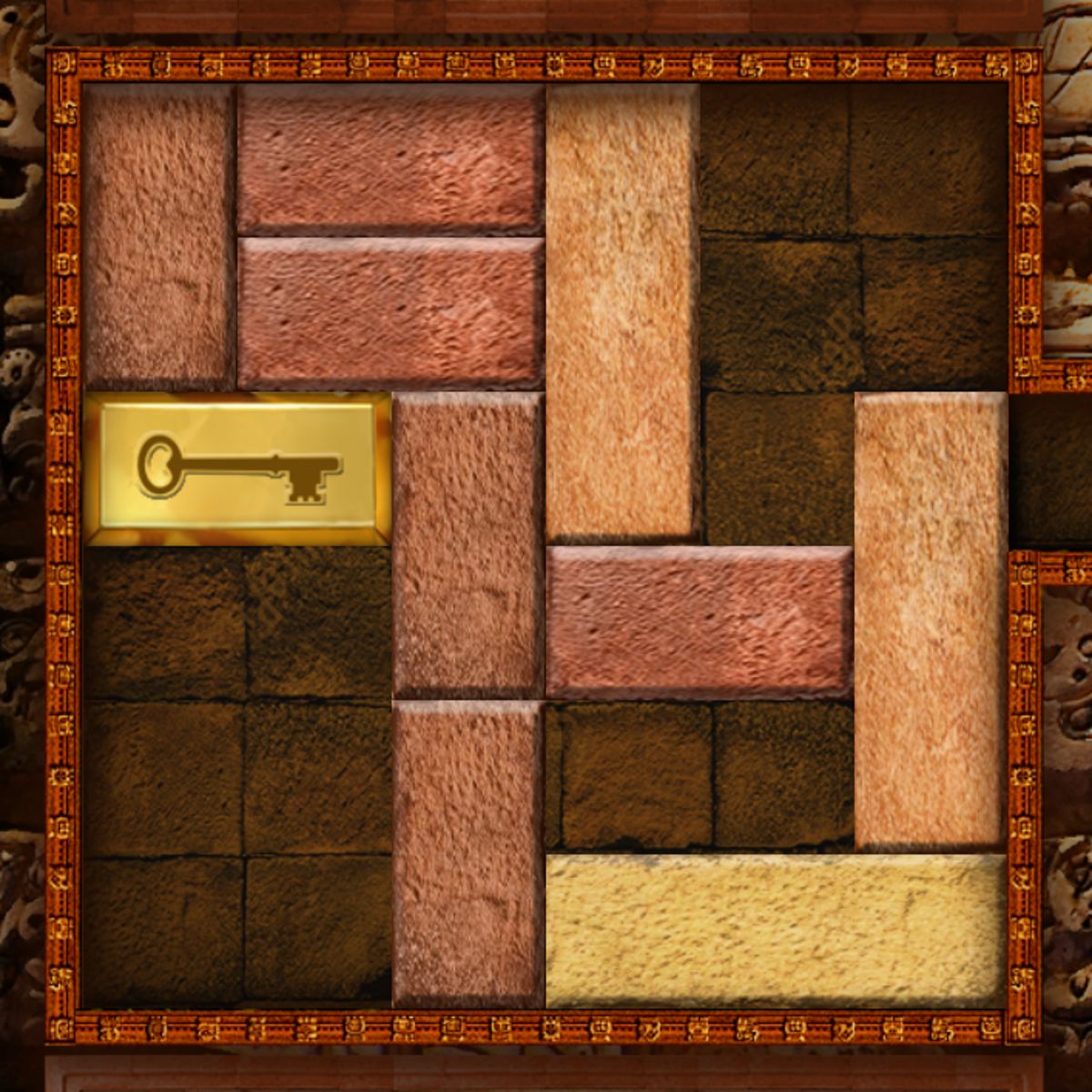
Your goal is simple: slide the key block to the exit slot on the edge of the grid. The exit is marked by a small opening in the frame. To reach it, you have to move other blocks out of the way. Blocks can only slide in the direction of their longest side—horizontal blocks move left and right, vertical blocks move up and down. You can’t lift them or rotate them. That’s the core constraint.
On desktop (mouse): Click a block and drag it in the direction you want it to slide. It moves as long as there’s empty space; if it can’t go further, it stops. You can also click to select, then drag. Intuitive after a couple of tries.
On mobile (touch): Tap and drag the block with your finger. Same rules apply—slide only along the long axis. Touch controls are responsive here because the blocks are large enough to tap accurately. On a phone, the game automatically scales the grid to fit your screen. No pinching or zooming needed.
There’s no time limit, so take your time. If you get stuck, restart the level with one tap. No penalty for restarting, and sometimes it’s faster to start fresh than to undo a mess of moves.
Features
Free The Key isn’t overloaded with features, but it has a few nice touches that keep it from feeling barebones.
- Level progression: The game starts with small 4x4 grids and gradually introduces larger boards. Early levels teach you the basic sliding mechanic. By level 20, you’ll see blocks that are three or four tiles long, forcing you to think several moves ahead. There are hundreds of levels (the exact number grows with updates), so you won’t run out of challenges quickly.
- Undo button: A small arrow in the corner lets you undo your last move. It’s limited—you can’t undo an entire chain of moves—but it’s useful if you accidentally slide a block one tile too far.
- Level select: You can jump back to any previously completed level. Handy for replaying a favorite puzzle or trying to solve it in fewer moves. The game doesn’t track move counts, so it’s purely for your own satisfaction.
- Clean design: No distracting backgrounds or animations. The blocks are shaded in soft colors (blues, greens, oranges) that are easy on the eyes. The key block is always gold, so you never lose sight of it.
There are no separate game modes (timed, endless, etc.). It’s a straight puzzle campaign. But the simplicity is part of the charm—you open the game, pick a level, and start sliding.
Tips and Strategies
After playing a few dozen levels, you’ll notice patterns. Here’s what helps.
- Look for the bottleneck first. Before you move anything, scan the grid. Where is the key’s path blocked? Usually it’s one specific block wedged in the way. Figure out what needs to move to free that block, and work backward. This reverse-engineering approach saves a lot of random sliding.
- Don’t move blocks into corners unnecessarily. A block pushed against a wall can only move one way, which limits your options. Try to keep blocks in the center of the grid where they can slide in either direction. If you do need to park a block against a wall, make sure it’s not the one you’ll need to move later.
- Vertical blocks need vertical space; horizontal blocks need horizontal space. This sounds obvious, but many players forget that a vertical block can only move up or down. If a long vertical block is blocking the key, you need to clear a path above or below it—not beside it. Similarly, a horizontal block needs room to its left or right.
- Use the undo button sparingly. It’s there for a reason, but if you undo every other move, you’ll never learn the flow of the puzzle. Instead, commit to a sequence of moves. If it fails, restart the level. Starting fresh often reveals a simpler solution you missed.
- Count tiles. Each block occupies a certain number of tiles. The key block is two tiles long. The exit is one tile wide. So the key can only exit if it’s aligned perfectly with the opening. If you slide the key halfway to the exit and then realize it’s off by one tile, you’ll have to undo several moves. Pay attention to alignment early.
- Symmetry is your friend. Many levels are symmetrical. If you see a mirror-like arrangement, try moving blocks in pairs. For example, if there are two identical horizontal blocks on opposite sides, slide them both outward at the same time. This keeps the board balanced and often opens a central path.
- Take breaks. If a level feels impossible, step away for a few minutes. I’ve lost count of how many times I came back to a puzzle and solved it in two moves after staring at it blankly for ten minutes. Your brain works on problems in the background.
Common Mistakes
New players tend to make the same errors. Here’s what to watch out for.
- Sliding the key too early. It’s tempting to move the key toward the exit as soon as you see a gap. But if you slide it forward, you might trap it behind a block that you can’t move anymore. The key itself is also a block—it can be moved back and forth. Treat it like any other piece. Sometimes the solution involves moving the key away from the exit to create space for other blocks.
- Forgetting that blocks can’t overlap. Sounds silly, but in the heat of sliding, you might try to push a block into a space that’s already occupied. The game simply won’t let you, but you’ll waste time trying. Always check the tiles around a block before you start dragging.
- Overcomplicating simple levels. Early levels often have a straightforward solution: move one or two blocks out of the way, then slide the key out. But some players assume the game is tricky and start moving everything around. If you’ve made more than five moves on a level that looks small, stop and look for a simpler path.
- Ignoring the edges. The exit is always on the edge of the grid. Blocks flush against the edge can’t be moved outward—they’re stuck unless you slide them inward first. Beginners sometimes try to push a block that’s already against the wall, wondering why it won’t budge.
- Rushing on mobile. On a touchscreen, it’s easy to accidentally slide a block one tile too far because your finger drags slightly. The undo button helps, but if you’re in a hurry, you’ll make more mistakes. Slow down.
FAQ
Is Free The Key free to play?
Yes. It’s free in your browser with no paywalls. No in-app purchases or premium levels. The only “cost” is the occasional ad between levels, but they’re short and skippable.
How many levels are there?
The number grows with updates, but as of the latest version (June 2022), there are over 200 levels. Developer Alex Harrison has been adding new puzzles periodically.
Can I play on my phone?
Absolutely. The game works on both desktop and mobile browsers. Touch controls are smooth, and the grid resizes to fit your screen. No app download required.
Is there a time limit?
No. You can sit on a level as long as you want. The game is purely logic-based, so take your time.
What if I get stuck on a level?
Restart the level at any time. If you’re really stuck, try a different approach: work backward from the exit, or move the key to a different part of the grid. Some levels have multiple solutions. If all else fails, take a break and come back later.
Does the game save my progress?
Yes, as long as you don’t clear your browser cookies. Your progress is saved locally, so you can close the tab and pick up where you left off.
---
Free The Key is one of those rare browser games that respects your time. It doesn’t try to hook you with flashy graphics or endless notifications. It just gives you a clean puzzle, lets you think, and then quietly rewards you when that golden key finally slides home. If you’re in the mood for a calm mental workout, give it a try. You might find yourself stuck on level 47 for longer than you’d like to admit.