


Music Beat Rider
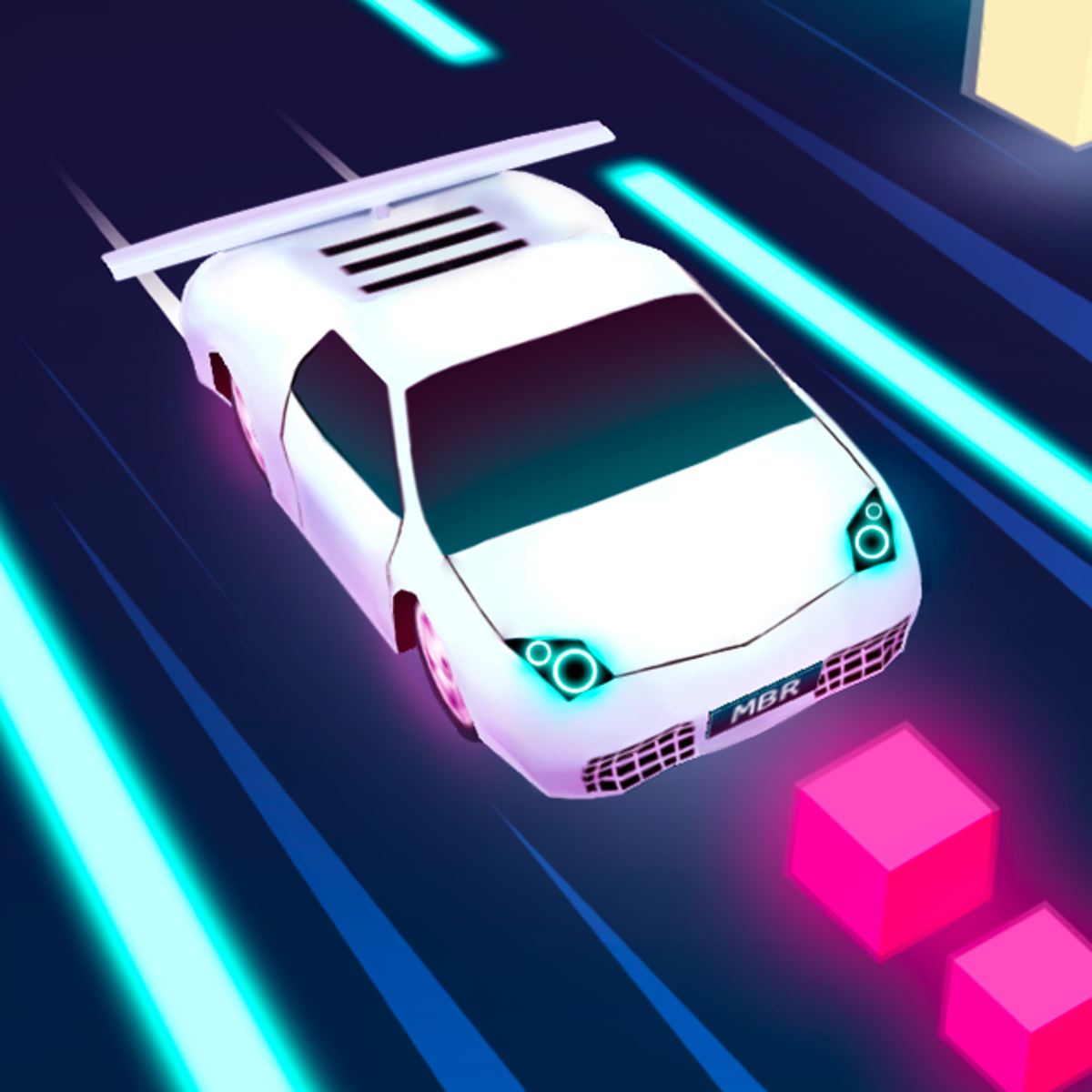
Not many browser games make you feel like you’re inside a music video. Music Beat Rider comes close. It’s a driving game set on a glowing futuristic highway where the road pulses to the beat. Your car zips forward automatically; all you do is steer left and right to hit the right obstacles and dodge the wrong ones. Simple on paper. But when the tempo picks up and lanes fill with hazards, it becomes a rhythm-action test that demands split-second timing.
What keeps me coming back is how personal it feels. You can pick from a handful of built-in tracks or upload your own MP3, and the game generates a course matching that song’s energy. The difficulty slider lets you dial it from a chill cruise to a frantic sprint. It’s not trying to be a deep racing sim or a complicated rhythm game – just a satisfying loop of drive, dodge, collect, and repeat, all while nodding your head to whatever tune you chose.
How to Play
Survive as long as possible. Steer your car into square-shaped obstacles for points and avoid sharp cones that end your run. The road has three or four lanes, and obstacles appear in patterns that roughly follow the song’s rhythm. Time your movements to the beat, and the run feels smoother.
Desktop controls:
Press A or the Left Arrow key to move left. Press D or the Right Arrow key to move right. That’s it. No brake, no accelerator – your car drives itself forward at a fixed speed set by the difficulty.
Mobile controls:
On a phone or tablet, tap the left or right side of the screen to steer. Touch input is smooth, and the lanes are wide enough that you won’t accidentally tap the wrong side during a tense moment. I’d still recommend a desktop for the most precise control, but the mobile version works fine for quick sessions.
Before you start, you’ll see a menu where you choose your music and set the difficulty. The built-in songs cover a few genres – electronic, pop, rock – but the real fun is the “Upload Music” button. Pick any MP3 from your device, and the game analyzes its tempo to build a custom course. The results aren’t perfect (more on that later), but they’re usually good enough to make your favorite song feel like a game level.
Features
Music Beat Rider isn’t packed with modes, but it offers enough variety to keep you from getting bored after one run.
- Difficulty levels: Easy, Medium, Hard, or Extreme. Easy gives you more reaction time and fewer obstacles; Extreme floods the road with cones and speeds up the car considerably. Difficulty also affects how tightly obstacles sync to the music – on higher settings, patterns are more complex and require quicker lane changes.
- Built-in tracks: Six or seven pre-loaded songs. They’re decent – nothing you’d buy on Bandcamp, but they have clear beats and distinct sections (verse, chorus, build-up) that the game uses to vary obstacle patterns.
- Custom music upload: The standout feature. Load any MP3 from your computer or phone. The game scans the file and generates a course matching the song’s rhythm. It works best with music that has a steady beat (dance, electronic, pop) and less well with songs that have irregular tempo changes or long silent sections.
- Score and leaderboard: Your score is based on how many obstacles you hit and how long you survive. There’s an online leaderboard, but it’s not particularly active – most of the competition is against your own best runs.
No car customization, no upgrade system, no multiple tracks. The game is laser-focused on one thing: driving to the beat. If that sounds like enough, you’ll get a lot of playtime out of it.
Tips and Strategies
After a few dozen runs, you start to notice patterns. Here’s what actually helps:
- Listen more than you look. Your eyes naturally track the road ahead, but your ears can predict when the next obstacle wave is coming. Most patterns align with the downbeat or snare hits. If you feel the rhythm, your lane changes become more instinctive and less frantic.
- Don’t oversteer. On higher difficulties, it’s tempting to spam left-right-left to catch every scoring block. That usually gets you killed. Commit to one lane at a time. Only switch when you see a cone in your current lane or a clear scoring block in an adjacent lane.
- Use the edges. The leftmost and rightmost lanes are slightly safer because cones tend to cluster in the center lanes. On many songs, the pattern generator places more obstacles in the middle two lanes. Staying near the edge gives you an extra split-second to react.
- Match difficulty to the song. A fast electronic track at 140 BPM works great on Hard. A slow acoustic ballad feels better on Easy. If you force a mellow song onto Extreme, the game spawns obstacles faster than the music suggests, and the disconnect is jarring.
- Upload songs with clear intros. The game needs a few seconds to analyze the file. Songs that start with a drum fill or a sudden loud section can confuse the pattern generator, leading to a messy first few seconds. Pick tracks with a clean, steady intro.
Common Mistakes
New players tend to make the same errors. Avoid them and your score will improve fast.
- Chasing every scoring block. You don’t need to hit every square for a good score. Better to miss a block than swerve into a cone trying to grab it. Patience beats greed every time.
- Ignoring the beat. Sounds obvious, but a lot of people treat it like a pure driving game and react visually. The game is designed so obstacle placements sync to the music. If you’re not tapping your foot, you’re probably missing the cues.
- Using custom music that’s too long. Songs over five minutes can cause the game to desync slightly near the end. The pattern generator seems to struggle with longer files. Stick to 3–4 minute tracks for the best experience.
- Playing on Extreme right away. The jump from Medium to Hard is manageable. Extreme is a different beast – the car moves noticeably faster, and obstacle density is brutal. Build up to it.
- Not adjusting the volume. The game’s sound effects (engine hum, crash noises) can drown out the music if your audio balance is off. I lower the SFX slider to about 30% so the beat stays prominent.
FAQ
Can I upload music from Spotify or YouTube?
No, the game requires an actual MP3 file on your device. You’ll need to download the song first. There’s no streaming integration.
Does the game work offline?
Once loaded in your browser, Music Beat Rider runs locally. You can play without an internet connection after the initial load, but custom music uploads require the page to be active.
Is there a two-player mode?
No. It’s single-player only. The description on some sites might hint at multiplayer, but the current version is strictly solo.
Why do some custom songs feel out of sync?
The game’s beat detection isn’t perfect. Songs with complex time signatures, swing rhythms, or sudden tempo changes will produce erratic obstacle patterns. Stick to straightforward 4/4 music for the best results.
How do I reset my high score?
There’s no in-game reset button. You can clear your browser’s local storage for the site, or just play a few bad runs – the score only saves the highest one.
Closing
Music Beat Rider is a lean, focused game that delivers on its promise: let you drive to your own soundtrack. It won’t replace your favorite rhythm game or racing sim, but for a free browser title, it’s a genuinely enjoyable way to kill twenty minutes. The custom music upload is the hook that keeps me coming back – there’s something satisfying about turning a song you love into a playable course, even if the sync isn’t always perfect. If you’re into driving games and have a few MP3s you’re tired of just listening to, give it a spin. Just remember to keep your eyes on the road – and your ears on the beat.